





Overview
The Attendance module allows teachers and administrators to record daily student attendance for each class. Attendance records help schools track student participation, monitor trends, and support accurate academic reporting.
Marking Attendance
- Organization Dashboard → Select a Class → Attendance
- Select edit for an attendance date.
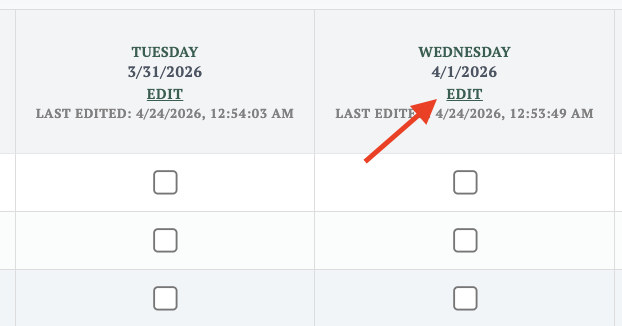
- Mark each student with the appropriate status — present, absent
Click Save to record attendance.
Automatic Attendance
When a student maintains a consistent attendance streak, Managira automatically marks them as present on subsequent days until their status is manually changed.
💡 Tip: You can also select and mark attendance for all students in the class at once, saving time on days with full or near-full attendance.
Holidays and Weekends
Holiday and weekend rules are configured at the school level and automatically exclude those days from attendance calculations, ensuring your attendance data remains accurate.
To configure holidays and non-school days:
☰ Menu → Settings → Customize School → School Calendar Rules
From here you can define recurring weekend days and mark specific dates as holidays. These days will be excluded from attendance records and calculations automatically.
Best Practices
- Always verify the correct date is selected before saving attendance.
- Attendance records can be updated at any time if corrections are needed.
- Review attendance records regularly to identify and act on absenteeism trends early.