

Overview
The SMS Integrations module lets each school connect its own SMS provider account to Managira and send messages — attendance alerts, fee reminders, announcements, report cards and other important updates — directly to parents, students and staff. Each school uses its own provider account and wallet when needed, so you only pay for the messages you send.
Accessing SMS Integrations
- ☰ Menu → Management Tools → Integrations
- Find the SMS provider you want: Twilio (US, Canada, Europe), Arkesel (Ghana) or Africa's Talking (Africa).
- Select Activate.
Twilio
Site: https://www.twilio.com
Best for: USA, Canada, and countries outside the coverage of Africa's Talking and Arkesel (global reach).
Set up your account and get your credentials
- Go to the site above and Sign Up, then verify your email and phone. Trial accounts include free credit for testing.
- Get a phone number: Console → Get a phone number (or Phone Numbers → Buy a number). This number is what your messages are sent from. On a trial you get one number, and it can only send to numbers you've verified in your sign-up country.
- On the Console dashboard, copy your Account SID and Auth Token.
- Come back to Managira, select Twilio, and enter your Account SID, Auth Token, and your Twilio phone number.
- To send to real phones and other countries, upgrade the account (add funds) and complete registration — see below.
Sender and registration
Unlike Africa's Talking and Arkesel, Twilio sends from a real Twilio phone number, not a school-name Sender ID (in the US and Canada). Some countries support alphanumeric Sender IDs — check Twilio's per-country guidelines.
For USA and Canada, business messaging requires A2P 10DLC brand and campaign registration (or a verified toll-free number) before reliable delivery. This is done once in the Twilio Console.
💡 Tip: For Twilio you enter three things in Managira — Account SID, Auth Token, and your Twilio phone number.
Africa's Talking
Site: https://account.africastalking.com
Supported in: Kenya, Uganda, Tanzania, Rwanda, Malawi, Zambia, Nigeria, Côte d'Ivoire, Ethiopia, Ghana, South Africa
Set up your account and get your credentials
- Go to the site above and Sign Up (or Log In if you already have an account).
- Verify your email. Once verification is complete, you'll be able to see Teams.
- Under Teams, create a New Team.
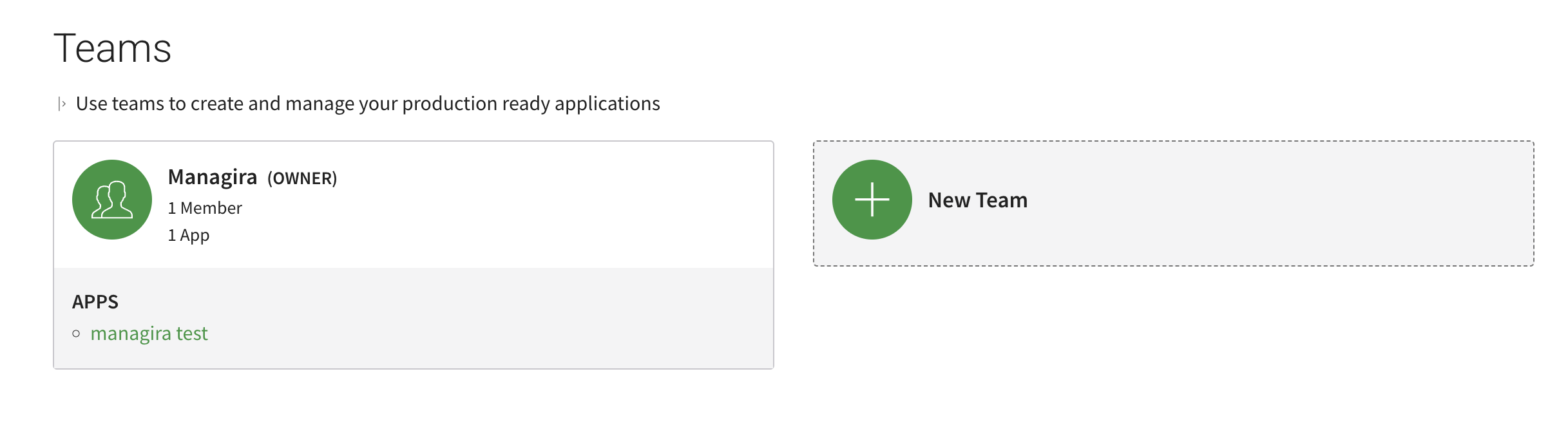
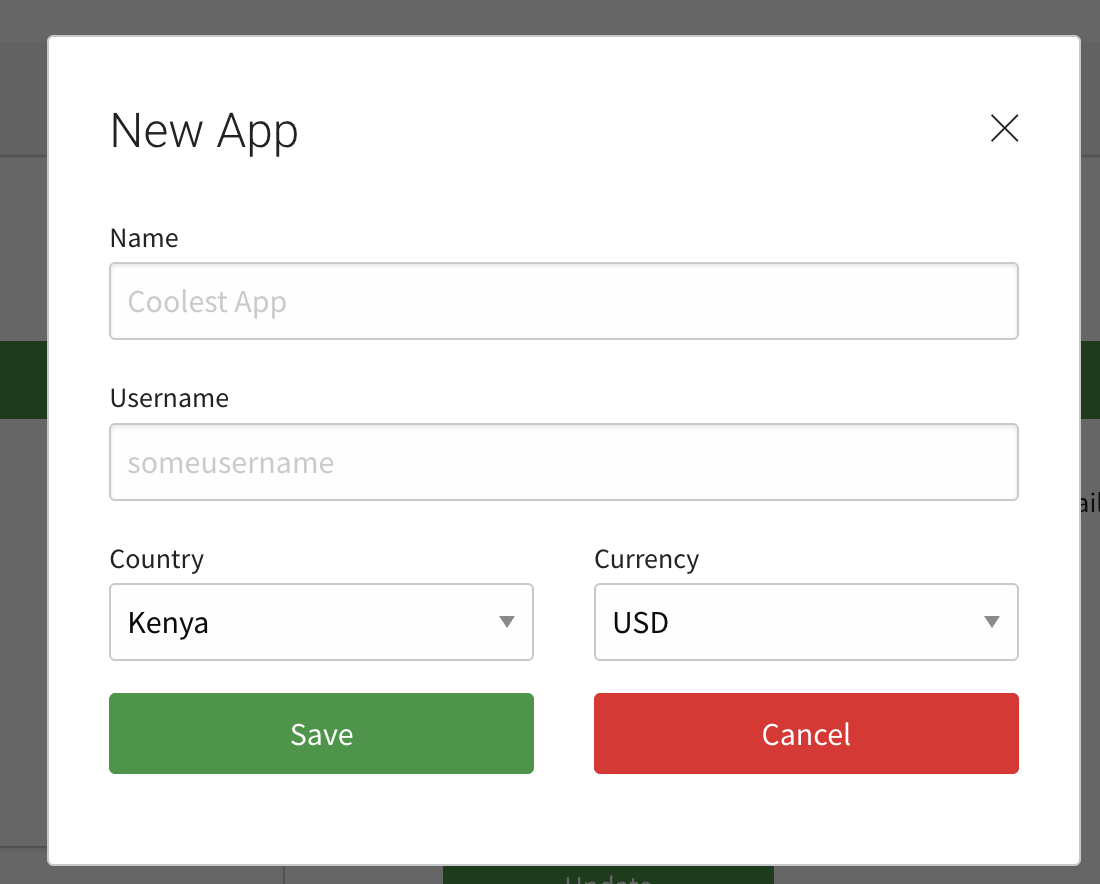
- Click into your team and Create an App. It will ask for your App Name — you can use your school name — then Save.
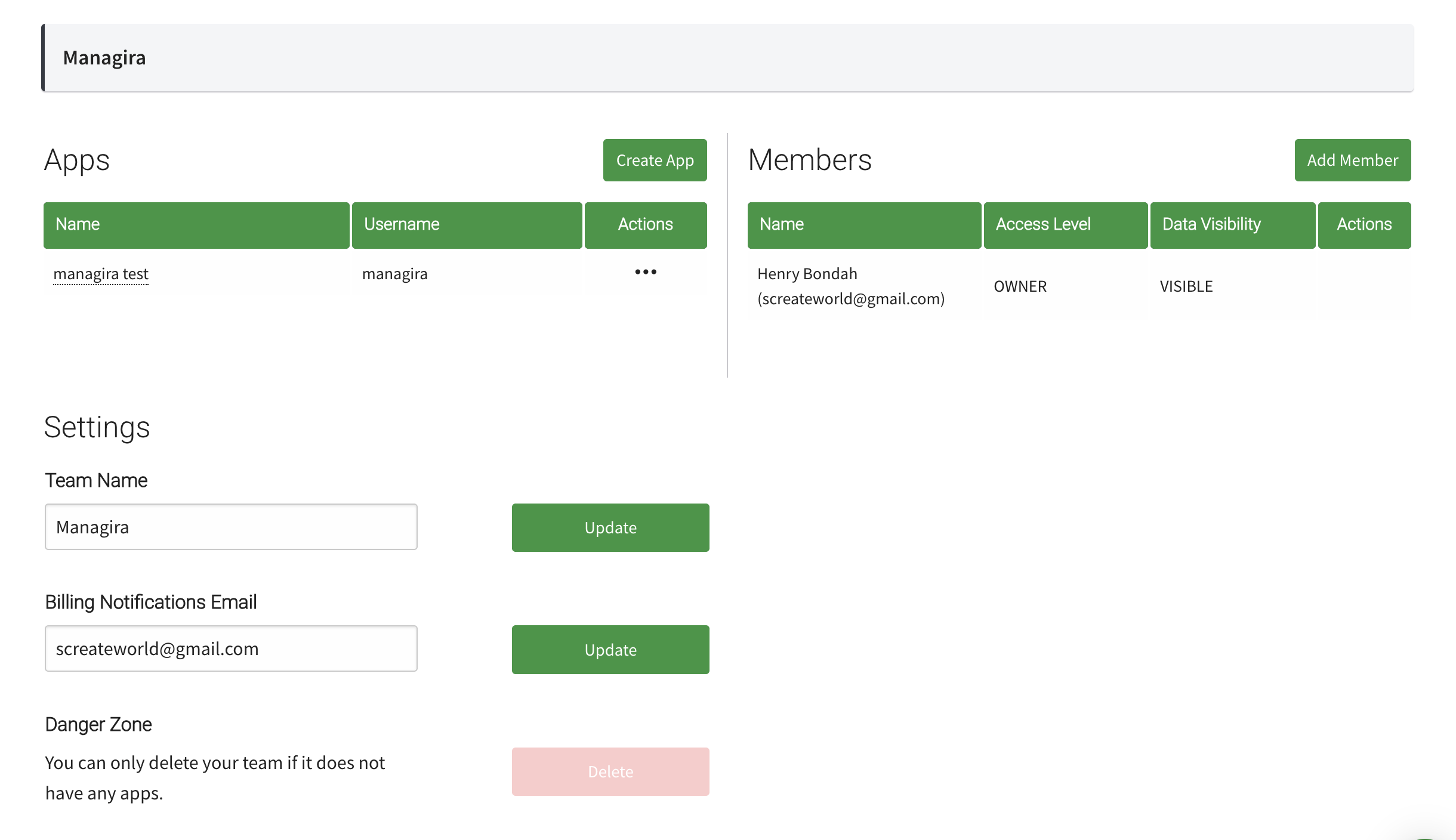
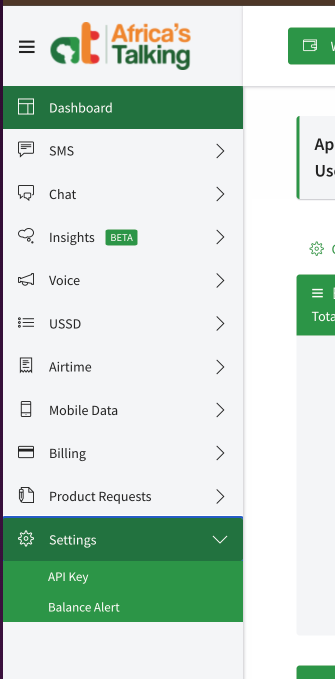
- Click into the app → Settings → API Key → enter your password → Generate. Copy and save this key immediately — it is shown only once.
- Come back to Managira and enter your Username and the API Key you just generated.
Sender ID (optional)
A Sender ID shows your school's name instead of a number and helps keep messages out of spam. To request one: Dashboard → SMS → Alphanumerics → Request Alphanumeric Sender ID → enter your preferred name (max 11 characters, e.g. your school name) and use case → submit for approval.
Until the Sender ID is approved, leave the Sender ID field blank in Managira. Messages will still send from a shared number.
💡 Tip: For Africa's Talking you enter three things in Managira — Username, API Key, and (optionally) Sender ID.
Arkesel
Site: https://arkesel.com
Supported in: Ghana, Nigeria, Tanzania, South Africa
Set up your account and get your credentials
- Go to the site above and Sign Up. Choose your country during signup (this sets your billing currency and payment methods — it does not limit which countries you can send to). Verify your phone number, then Log In.
- New accounts include a few free test SMS (shown as SMS Balance at the top of the dashboard), so you can test right away. For real volume, top up your wallet via Mobile Money or card (Recharge / "Top up").
- Go to API in the left menu → Generate new key → copy and save your Main SMS API key.
- Come back to Managira, select Arkesel, and enter your API Key (and Sender ID if you have one).
- The Sender ID is optional — see below.
Sender ID (optional)
Dashboard → SMS → Sender ID → request a new Sender ID (max 11 characters, e.g. your school name).
Ghana note: AirtelTigo requires a signed Letter of Authorization before your Sender ID is whitelisted. To submit it: Dashboard → SMS → Sender ID → Submit Documents → upload your Letter of Authorization (.doc/.docx/.pdf), then attach a business certificate (for a business/school) or a Ghana ID / ECOWAS card (for non-business), select the Sender ID(s) to whitelist, and Submit. Verification can take up to 72 hours. Use the Download Sample File on that page as your template.
Until the Sender ID is approved, you can still send — messages go from a generic number. Note: without a whitelisted Sender ID, delivery to AirtelTigo (Ghana) numbers may fail, though MTN and Telecel usually still deliver.
💡 Tip: For Arkesel you enter two things in Managira — API Key and Sender ID (no username).
Check that it works
- Save and test checks your details with the provider before saving. No message is sent and nothing is charged.
- Test connection on a connected card checks the saved details again at any time.
- Send a test text sends one real message to a number you choose, so you can see it arrive.
If something goes wrong
- “Twilio didn’t accept this Account SID and Auth Token”: copy both again from the Twilio Console home page.
- “isn’t a number in this Twilio account”: use a number from Phone Numbers → Active numbers, with the country code (for example +15551234567).
- “Arkesel didn’t accept this API key”: generate or copy the key again under API in Arkesel.
- “Africa’s Talking didn’t accept this username and API key”: make sure both come from the same live app, not the sandbox.
- Messages show as failed: check the parent’s number includes the country code and your provider account has credit.
Frequently asked questions
Which SMS provider should my school use?
Twilio for the United States, Canada, the UK and Europe; Arkesel for Ghana; Africa’s Talking elsewhere in Africa. Managira only shows providers available in your school’s country.
Does testing the connection cost anything?
No. Save and test and Test connection only check your account details. Only Send a test text sends a real, paid message.
Who pays for the messages?
Your school, through its own provider account. Managira doesn’t add a markup. If your school is in a hub, the hub’s plan may include a fee for text messages.
Can we switch providers later?
Yes. Set up the new provider and press Save and test. It becomes your school’s text sender right away.