
Your class page
One page per class: students, attendance, grading, assessment questions, schedule, activities, the Pickup list, parent messages and transportation.
Select a class on your dashboard to open its page. A teacher sees the classes assigned to them; managers and supervisors see every class.
Who can do this: Teachers for their own classes; managers and supervisors for every class.
What's on a class page
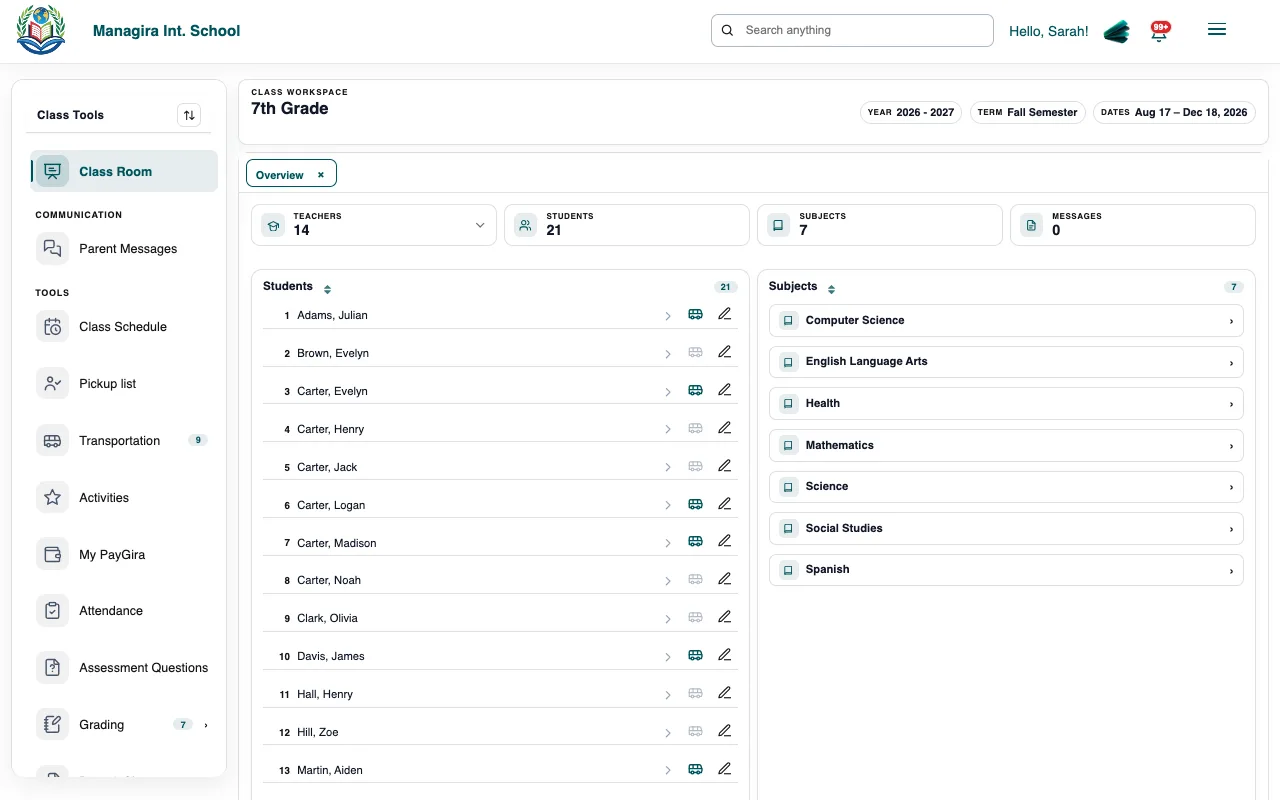
| Section | What you do there |
|---|---|
| Class Room | See every student; open one to see their details, parents and history. |
| Attendance | Mark today's attendance and look back over past days. |
| Grading | Enter and review scores for the class's assessments. |
| Assessment Questions | Write questions for online tests in the Testing Room. |
| Class Schedule | The class timetable by day and period. |
| Activities | Field trips, clubs and events for the class or one student. |
| Pickup list | Who may pick up each student, from the details your school shares with teachers. |
| Parent Messages | Messages from parents of students in the class. |
| Transportation | Which students ride which bus, live bus tracking and class bus reports. |
| Docs & Sheets | Class documents and spreadsheets. |
Frequently asked questions
Why don't I see all of these?
Some sections need a permission or a feature your school turns on, such as Transportation.
Was this guide helpful?