
Tenant configuration: your school's sign-in rules
Choose how long people stay signed in, whether Keep me logged in is allowed, whether a code is emailed at sign-in, and how long a browser is trusted.
Tenant configuration sets the sign-in rules for everyone at your school. The defaults suit most schools; change them to match your district's security policy.
Who can do this: Managers only.
Change the rules
Open Settings, then Tenant configuration.
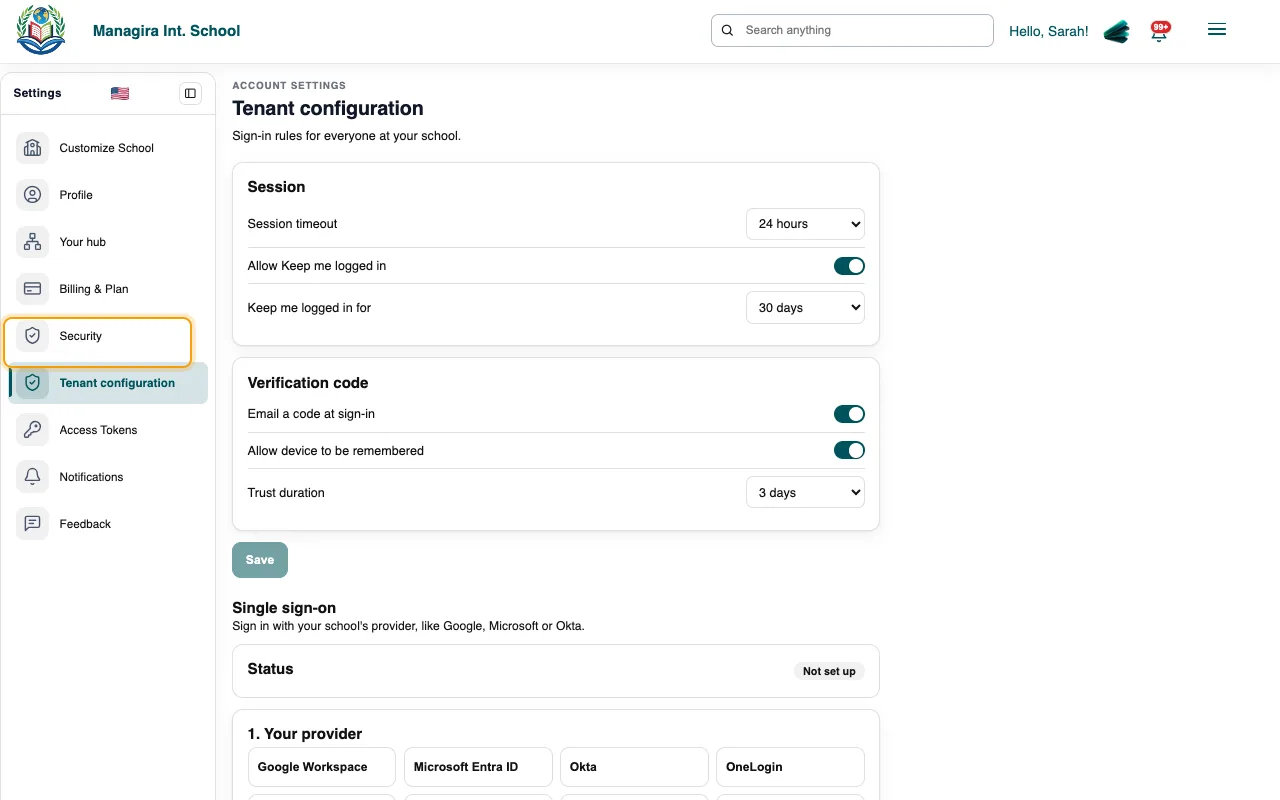
Settings, Tenant configuration: sign-in rules for everyone at your school. Adjust the settings below and save. They apply from each person's next sign-in.
The settings
| Setting | What it does | Default |
|---|---|---|
| Session timeout | Signs people out after this long, even if they're active: 8, 12, 24 or 72 hours, or 7 days. | 24 hours |
| Allow Keep me logged in | Shows the Keep me logged in box at sign-in. | On |
| Keep me logged in for | How long a ticked Keep me logged in lasts: 7, 14, 30, 60 or 90 days. | 30 days |
| Email a code at sign-in | Asks for a code sent by email after the password, on a browser that isn't remembered. | On |
| Allow device to be remembered | After a right code, skips the code on that browser for a while. | On |
| Trust duration | How long a browser stays remembered, counted from the code: 1, 3, 7, 14 or 30 days. | 3 days |
Good to know: If the settings can't be read for a moment, nobody is signed out because of it.
Frequently asked questions
Does this affect single sign-on?
Single sign-on skips the emailed code, because your provider has already checked the person. Session timeout still applies.
Do the rules apply to parents?
Yes. They apply to everyone who signs in to your school.
Was this guide helpful?