
The PayGira Overview
See at a glance what was billed, what was paid and what is still owed for a term, with the latest payments.
The Overview is PayGira's front page: three totals for a term, the bills behind them and the newest payments.
Who can do this: Managers, and staff given PayGira › Overview.
Open the Overview
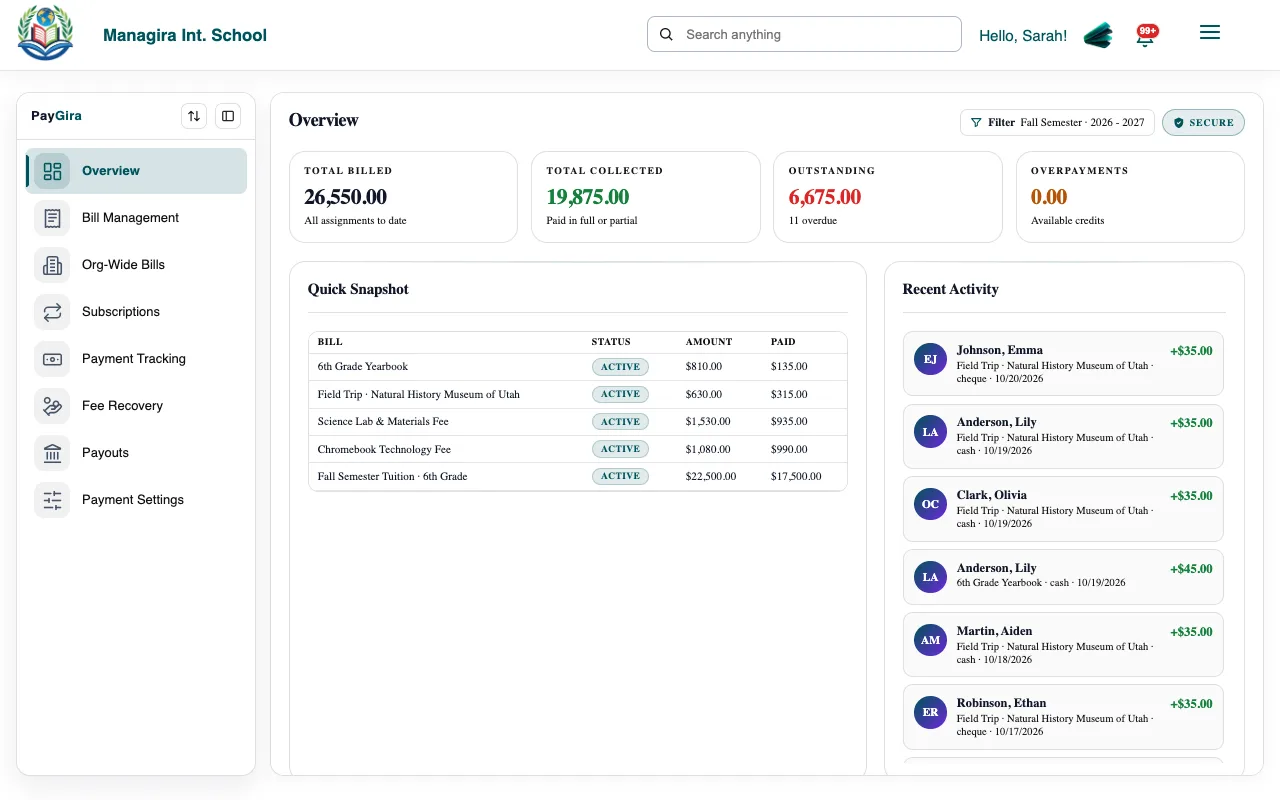
Go to Management › PayGira and select Overview.
What each part shows
- Billed: everything sent as bills in the period.
- Paid: what families have paid, with the share of the total billed.
- Still owed: what is left to collect, and how many balances are overdue.
- Bills: each bill with its status, amount billed and amount paid. All bills opens the Bills page.
- Latest payments: the newest payments with student, bill, method and date. All payments opens the Payments page.
- Charts and bill-by-bill breakdown: open it for charts and a closer look at each bill.
Change the period
Select Filter at the top right. It shows the school year and term now in view, for example Fall Semester · 2026-2027.
Choose another school year or term. The totals, bills and payments change to match.
Good to know: Money owed carries over: a student's ledger shows what they owe across all terms, while the Overview and Bills show the period you chose.
Frequently asked questions
The totals look too low.
The Overview covers one term at a time. Use Filter to look at another term, or open the Student ledger for each student's full balance.
Was this guide helpful?